ICS Virtual Lab for Pentesting [GNS3][OPENPLC][SCADABR][FACTORY I/O]
After learning basics of ICS virtualization (you can read about it there) I have started building my first one. I have experience
with building labs in VirtualBox but this is my first build in GNS3.
DISCLAIMER
Due to limited hardware resources this lab contains only minimal amount of machines and doesnt follow any of ICS security rules like Purdue Model. It is basic naked rig made for penetration testing and it is not a realistic simulation of ICS.
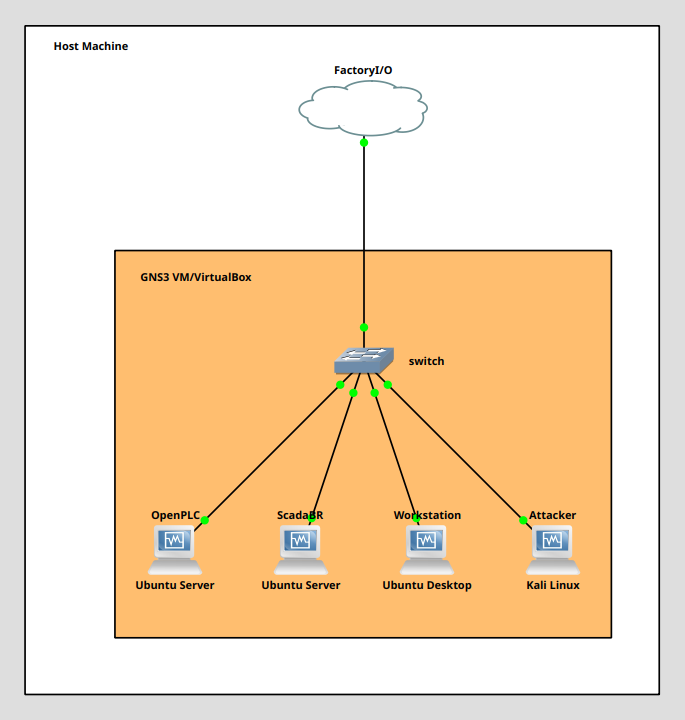
OpenPLC
Simulates PLC device and executes programs created in the OpenPLC Editor. Receives input signals, executes the program logic, and generates output signals. It can be controlled from the Workstation using the OpenPLC web panel and from Factory I/O. ScadaBR
Allows to create HMI's (Human Machine Interfaces) Workstation
Used to accesing OpenPLC and ScadaBR webpanels and to making PLC programs with OpenPLC Editor FactoryI/O
Simulates industrial machines
STEPS AND TIPS:
Using search engines you can find few posts and videos about making such a lab with more or less detailed tutorials. I will only outline main steps and give few tips which I would to know before and may be useful for someone else.
STEPS
Install KaliLinux, 2x Ubuntu Server and 1x Ubuntu Server machines in VirtualBox
Install OpenPLC and ScadaBR on Ubuntu Server machines
Install OpenPLC Editor on Ubuntu Dekstop machine
Configure static ip addresses on every machine
In VirtualBox set every machine network interface to "Not Attached"
Import machines into GNS3
Create tun interface on host machine
Connect machines in GNS3 using default switch
Create basic scene in FactoryI/O
Create PLC program in OpenPLC Editor and export it to OpenPLC
Create Modbus TCP Sever in FactoryI/O
Connect OpenPLC to FactoryI/O Server
Connect ScadaBR to OpenPLC
Try it
If works, get ready to hacking!
TIPS
For OpenPLC and ScadaBR machines use Ubuntu Server instead Ubuntu Desktop to save hardware resources
Instead using ScadaBR VM image, install ScadaBR from github repository on clean Ubuntu Server to avoid unnecessary problems with networking in GNS3
FactoryI/O used for simulating factory environment is GPU-based so using it in virtual machine is problematic. That's why I have created gns3's CLOUD node and TAP network interface on host machine. Next, I have installed FactoryI/O on Lutris platform (normally used to emulating Windows games in Linux OS's)
If FactoryI/O gives you error while creating MODBUS server just try other port. Default Lutris/Wine configuration is good to go.
RESULTS:
Green button -> Boxes are moving
It's a beatiful view after few days of learning and trying. Now it's time for breaking it.